Turn Photo Cleanup Into a Daily Habit: How Gamification Changed Everything

Be honest: how many photos are on your iPhone right now? And how many of those do you actually want to keep?
For most people, the answer to the first question is somewhere between 5,000 and 50,000. The answer to the second is… a lot fewer. The gap between those two numbers represents weeks of accumulated screenshots, duplicate sunset shots, blurry accidents, photos of receipts you already filed, and seventeen nearly identical selfies from that one time the lighting was really good.
You know you should clean them up. You have probably said “I really need to go through my photos” at least a dozen times this year. But you have not done it. And you are not alone.
Why We Procrastinate on Photo Organization
Photo cleanup has a procrastination problem, and it is not because people are lazy. It is because the task has several psychological characteristics that make it uniquely easy to put off:
- The scope is overwhelming - “Go through 20,000 photos” is not a task. It is a project with no clear starting point, no obvious strategy, and no visible end. Our brains are wired to avoid tasks that feel too large to complete in one sitting
- There is no urgency - Unlike a cluttered kitchen or a full email inbox, a messy photo library does not actively interfere with your day. The “cost” of keeping 15,000 unnecessary photos is invisible (until your phone runs out of storage)
- Every photo requires a decision - Delete or keep? This seems simple, but decision fatigue is real. After making 200 keep-or-delete decisions, your brain is exhausted and wants to stop
- No immediate reward - Clean your kitchen and you immediately see and feel the result. Clean 500 photos and your gallery looks… basically the same. The reward is abstract (more storage, better organization) and delayed
- Fear of deleting something important - What if you delete a photo and then want it later? This anxiety makes every “delete” decision feel risky, slowing you down further
This combination of factors explains why most people’s photo libraries grow endlessly while the intention to clean them remains permanently on the “someday” list.
Recommended reading: Clean Photos From Your Home Screen: Interactive Widgets and Live Activities for iPhone
So how do you fix this? You change the game. Literally.
The Psychology of Gamification
Gamification is the application of game-design principles to non-game activities. It is the reason Duolingo made language learning addictive, why fitness trackers motivate people to walk 10,000 steps, and how Wordle became a daily ritual for millions.
The science behind it comes down to a few well-studied psychological principles:
Recommended reading: The Best Free Photo Editor Built Into Your Gallery Cleaner
Variable rewards
The most engaging games do not give you the same reward every time. Sometimes you get a small win, sometimes a big one, and sometimes a surprise. This unpredictability triggers dopamine release in the brain and keeps you coming back. In photo cleanup, this translates to session stats that vary each time, unexpected milestones, and the satisfaction of finding and deleting a large batch of similar photos.
Progress visualization
Seeing tangible evidence that you are making progress is incredibly motivating. Progress bars, counters, and statistics transform an abstract task (“clean up my photos”) into a concrete, measurable one (“I have reviewed 847 photos and freed up 2.3 GB this week”). When you can see the numbers, you want to make them bigger.
Streaks and consistency
Streaks exploit loss aversion, one of the most powerful psychological biases. Once you have built a 7-day streak, you do not want to break it. The longer the streak, the stronger the motivation. This is the same mechanism that makes Snapchat streaks sticky and why people go to extreme lengths to maintain their Duolingo streaks.
Recommended reading: Beauty Filters That Actually Look Natural: Tidy's Ethical Approach to Photo Enhancement
Micro-goals over macro-goals
“Clean up 20,000 photos” is paralyzing. “Review 50 photos in 5 minutes” is achievable. Gamification breaks impossible tasks into bite-sized challenges that feel manageable and satisfying to complete.
These principles are exactly what we built into Tidy. Let’s look at each gamification feature.

Ready to clean your gallery?
Download Tidy and start swiping. AI-powered duplicate detection, smart filters, and a photo editor built in.
Session Stats: See Your Impact in Real Time
Every time you use Tidy, the app tracks your session and shows you exactly what you accomplished. At the end of each cleaning session, you see a summary with four key metrics:
Example Session Stats
- 142 Photos Reviewed
- 89 Kept
- 53 Dropped
- 4:32 Time
This might seem simple, but the psychological impact is significant. Here is why each metric matters:
- Photos Reviewed - Shows the raw volume of work you did. Even if you kept most of them, you made a deliberate decision about each one. That is progress
- Kept - Reassures you that cleaning up does not mean losing everything. Most people keep 60-70% of their photos, which feels good
- Dropped - This is the satisfying number. Seeing “53 photos dropped” gives you a concrete sense of accomplishment. That is 53 fewer duplicates, blurry shots, or screenshots cluttering your library
- Time - Knowing you accomplished all that in under 5 minutes reframes the task. Photo cleanup is not a weekend project. It is a quick session you can fit into any break
The session stats also accumulate over time. You can see your total photos reviewed, total storage freed, and overall keep/drop ratio. Watching these lifetime numbers grow gives you a long-term sense of progress that individual sessions cannot.
Cleaning Streaks: Build Momentum That Sticks
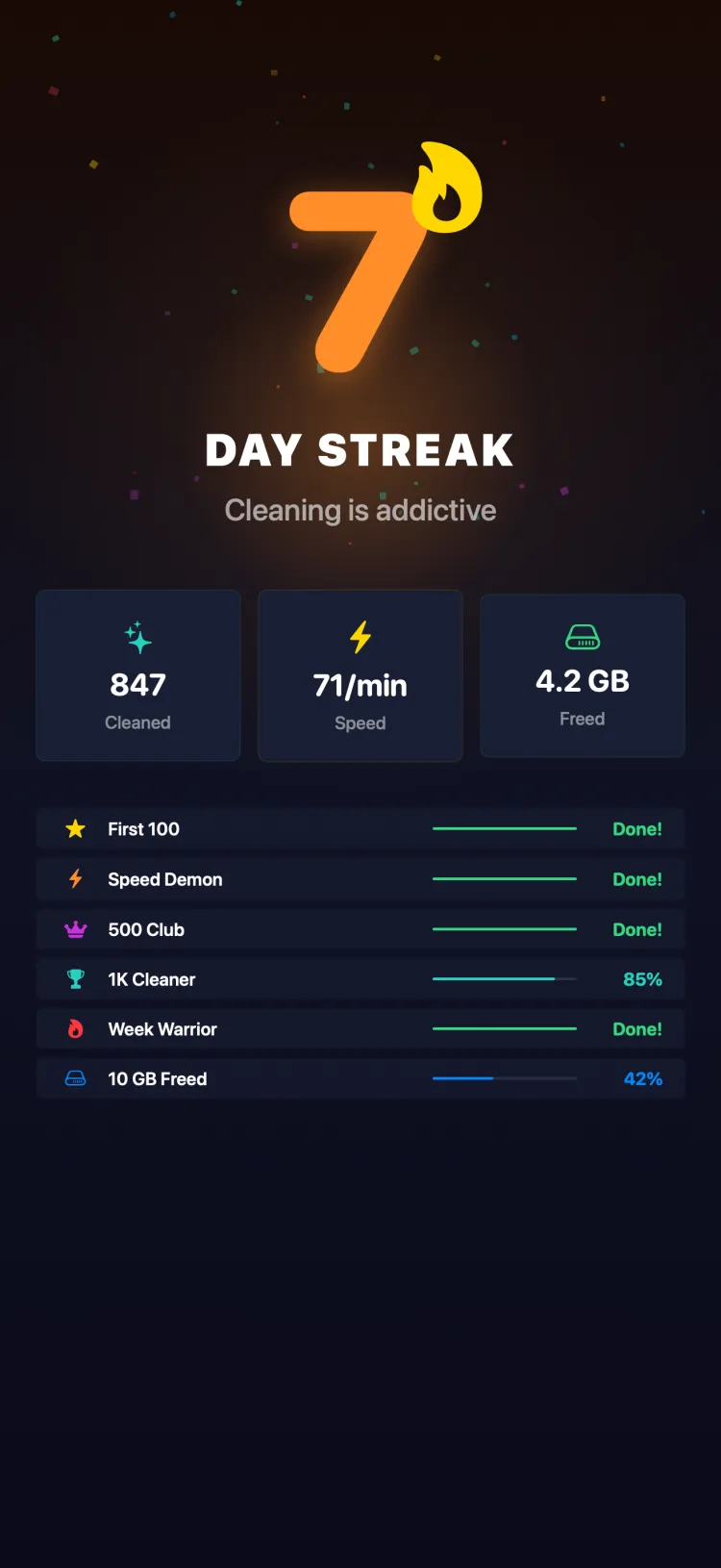
Streaks are the heartbeat of Tidy’s gamification system. Here is how they work:
Daily streaks track consecutive days of cleaning activity. Use Tidy and review at least one photo, and your streak continues. Miss a day, and it resets to zero. Simple, clear, effective.
Weekly streaks are a bit more forgiving. They track consecutive weeks where you had at least one cleaning session. This is better for people who do not use their phone every single day but still want to maintain a habit.
Why are streaks so effective?
- Loss aversion - Once you have a 14-day streak, the thought of losing it feels worse than the effort of doing a quick 2-minute cleaning session. You will find yourself opening Tidy even on busy days “just to keep the streak alive”
- Identity formation - After a few weeks of maintaining a streak, you start thinking of yourself as “someone who keeps their photo library clean.” This identity shift makes the habit self-reinforcing
- Lowering the bar - Streaks redefine success. You do not need to clean 1,000 photos to have a “good” day. You just need to open the app and review a handful. Most days, you will end up doing more than the minimum
We designed Tidy’s streaks to be motivating, not punishing. If you miss a day, there is no guilt trip or condescending message. Your streak counter resets quietly, and you start building the next one. The focus is always forward.
Milestones and Confetti: Celebrate the Wins
Milestones are specific achievements that Tidy recognizes and celebrates. They provide the “variable rewards” that keep the experience fresh and surprising.
Examples of milestones include:
- First 100 photos reviewed - Your entry into the world of organized photo libraries
- First 1 GB freed - Proof that cleaning up has real, tangible benefits
- 7-day streak - You have built a genuine daily habit
- 1,000 photos reviewed - You are officially a power cleaner
- 30-day streak - At this point, it is just part of your routine
When you hit a milestone, Tidy celebrates with a confetti animation. It is a small thing, but it works. That burst of colorful particles and a satisfying haptic tap creates a moment of genuine delight. It is the app’s way of saying “nice work” in a way that feels earned and fun.
The confetti animation is not just visual. Tidy uses iOS haptic feedback to add a tactile “pop” that syncs with the visual celebration. On an iPhone, you feel the milestone in your hand. It sounds minor, but these multi-sensory micro-rewards are what make gamification work at a subconscious level.
Milestones are also spaced out strategically. Early milestones come quickly (to hook you in), while later ones require more effort (to sustain long-term engagement). This spacing mirrors how the best video games structure their reward systems.
Shareable Cleanup Cards
Here is something we learned from fitness apps: people love sharing their progress. When someone hits 10,000 steps or completes a marathon, they screenshot their stats and post them. The same principle applies to photo cleanup.
Tidy generates shareable cleanup cards that summarize your session or milestone in a beautiful, ready-to-share format. Each card includes:
- Your session stats (photos reviewed, kept, dropped, time)
- Your current streak
- Storage freed
- A visually appealing design with the Tidy branding
The cards are designed to look good on Instagram Stories, iMessage, WhatsApp, and other platforms where people share achievements. They are not just screenshots of the app. They are purpose-built graphics that tell a story.
Sharing serves two purposes. First, it adds a social accountability layer. When your friends know you are on a 21-day cleaning streak, you have extra motivation to keep it going. Second, it introduces Tidy to new people organically. The best marketing is a genuine recommendation from someone who is actually enjoying the product.
The Simple Math: 5 Minutes a Day
Here is a number that might surprise you: the average Tidy user reviews about 30 photos per minute using the swipe interface. That is one decision every two seconds, which sounds fast but feels completely natural in the swipe-left/swipe-right flow.
At that pace, here is what 5 minutes of daily cleanup looks like over time:
5 Minutes a Day Adds Up
- 150 Photos per session
- 1,050 Photos per week
- 4,500 Photos per month
- 54,750 Photos per year
Read that last number again. 54,750 photos reviewed in a year, with just 5 minutes of daily effort. That is more photos than most people have on their phone.
And because each session frees up storage (the average photo is 3-5 MB, and most people drop about 30-40% of what they review), you are also recovering significant storage space:
- Per session: ~50 photos dropped = ~200 MB freed
- Per week: ~350 photos dropped = ~1.4 GB freed
- Per month: ~1,500 photos dropped = ~6 GB freed
Six gigabytes per month is not trivial. That is space for new apps, music, videos, and of course, more photos. The cleanup pays for itself.
Sharing Your Progress on Social Media
The cleanup card is your bragging tool, and we encourage you to use it. Here are a few ways people are sharing their Tidy progress:
- Instagram Stories - Post your cleanup card with a streak count. Add a “day 30” sticker for extra impact
- iMessage groups - Challenge friends to a cleanup week. Share daily cards and see who drops the most photos
- Twitter/X - There is a growing community of people posting their cleanup stats. Search for #TidyCleanup to see the movement
- TikTok - Short videos of the swipe game in action, set to music, ending with the stats card. It is oddly satisfying content
The social element transforms photo cleanup from a solitary chore into a shared experience. When your friend posts that they freed 8 GB of storage in a week, you think “I could do that.” And then you open the app.
Some couples and roommates have even turned it into a friendly competition, comparing weekly stats to see who can drop the most unnecessary photos. The stakes are low, but the fun is real.
Getting Started With Your First Streak
Ready to turn photo cleanup into a habit? Here is how to get started:
- Set a tiny goal - Commit to just 2 minutes of cleanup per day for the first week. That is about 60 photos. The point is to make it so easy that you cannot say no
- Pick a trigger - Attach your cleanup session to an existing habit. “After my morning coffee,” “during my commute,” or “before bed” are popular choices. The key is consistency, not duration
- Start with AI filters - Let Tidy’s AI identify the low-hanging fruit first. Blurry photos, screenshots, and duplicates are easy decisions that build momentum
- Watch your streak grow - After 3-4 days, the streak counter starts to feel important. Let that feeling motivate you
- Share your first milestone - When you hit 100 photos reviewed (it will happen faster than you think), share the cleanup card. The positive feedback will reinforce the habit
The habit stacking trick: The most successful Tidy users pair their cleanup session with something enjoyable - listening to a podcast, riding the bus, or waiting for food to arrive. The cleanup becomes associated with a pleasant activity, making it easier to stick with.
Photo cleanup does not have to be a dreaded chore that you put off indefinitely. With the right tools and a bit of gamification, it becomes something you actually look forward to. A 5-minute daily habit that keeps your photo library clean, your storage free, and your OCD happy.
If you want even quicker access to your cleaning sessions, check out how Tidy’s interactive widgets let you start cleaning from your home screen. And for the full story of how Tidy was rebuilt from the ground up, read about our comeback after 6 years.