Best iPhone Photo Editor 2026: 29 Free Filters in Tidy
Here is something that never made sense to us: you use one app to manage and clean your photos, then switch to a completely different app to edit them. Two apps. Two different interfaces. Two different workflows. All for working with the same photos.
When we built Tidy, we wanted to change that. Not just a cleaner with a basic crop tool bolted on, but a genuine, full-featured photo editor with 29 professional filters - adjustments, beauty tools, creative effects, and AI-powered enhancement - all built into the same app where you manage your gallery.
The result is an editor that rivals standalone apps, without the subscription fees most of them charge. Let’s walk through everything it can do.
Why You Don’t Need a Separate Photo Editor
Think about when you actually edit photos. It is almost always right after you take them or while you are browsing through your library. You spot a photo that is a little too dark, or you want to smooth out skin in a selfie before sharing it.
In that moment, the last thing you want is to leave your current app, open another one, find the same photo again, make your edits, save it, and then come back. That friction is why most people rarely edit their photos at all - even though a small tweak can make a huge difference.
Recommended reading: Beauty Filters That Actually Look Natural: Tidy's Ethical Approach to Photo Enhancement
With Tidy, the editor is right there. You are swiping through photos, you see one you love but it needs a quick adjustment - tap the edit button and you are in. Zero context switching. Zero friction. You can even edit photos that you are about to drop, rescue them with a quick enhance, and move them to your keep pile instead.
Adjustment Tools: The Foundation of Great Photos
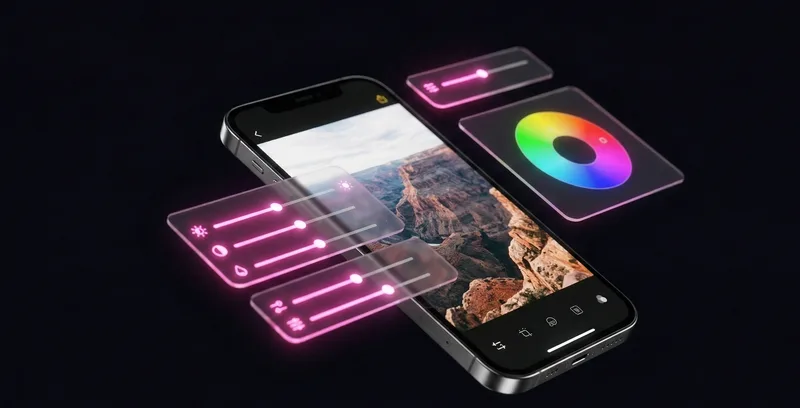
Tidy’s adjustment panel gives you precise control over every aspect of your photo’s look. These are the same tools professionals use, presented in a way that is intuitive enough for anyone.
Exposure
The most fundamental adjustment. If your photo is too dark or too bright, the exposure slider fixes it in one drag. Tidy’s exposure control works across the full tonal range, so you can recover detail in shadows without blowing out highlights.
Recommended reading: Clean Photos From Your Home Screen: Interactive Widgets and Live Activities for iPhone
Contrast
Contrast controls the difference between the darkest and lightest parts of your photo. Increasing contrast makes colors pop and details stand out - great for landscapes and street photography. Decreasing it creates a softer, more muted look that works beautifully for portraits.
Highlights and Shadows
These let you adjust the bright and dark areas of your photo independently. Shot a photo where the sky is too bright but the foreground is too dark? Pull down highlights and push up shadows. This alone can save photos you thought were ruined by tricky lighting.
Curves
For more advanced users, the RGB curves editor gives you full tonal control. Adjust the master curve for overall brightness, or manipulate red, green, and blue channels independently for precise color grading. This is the same tool used by professional editors in apps like Lightroom and Photoshop - right here on your phone.
Recommended reading: Turn Photo Cleanup Into a Daily Habit: How Gamification Changed Everything
HSL (Hue, Saturation, Luminance)
HSL controls let you adjust individual colors in your photo. Want bluer skies without changing skin tones? Boost the blue saturation. Want warmer sunset oranges? Shift the orange hue. HSL is incredibly powerful because it lets you sculpt color with surgical precision, targeting specific tones without affecting the rest of the image.
Grain
Sometimes perfect digital sharpness is not what you want. The grain control adds natural-looking film grain to your photos, giving them a textured, analog feel. It is subtle enough at low levels to just add character, or strong enough to create a full vintage film look.
Background Blur
Tidy uses Apple’s person segmentation AI to detect people in your photos and selectively blur the background. The result is a natural-looking bokeh effect - similar to Portrait Mode, but applied to any photo after the fact. Perfect for selfies and group shots where the background is distracting.

Ready to clean your gallery?
Download Tidy and start swiping. AI-powered duplicate detection, smart filters, and a photo editor built in.
Beauty Filters: Enhance Portraits Naturally
Portrait editing is where Tidy really stands apart from basic editors. The beauty tools use face detection and AI to apply targeted enhancements that look natural, not over-processed.
Skin Smooth
Reduces the appearance of blemishes and uneven texture while preserving natural skin detail. The algorithm is intelligent enough to smooth skin without creating that plastic, over-filtered look that plagues so many beauty apps. You can control the intensity from subtle (barely noticeable) to strong (smooth and polished).
Portrait Light
Simulates professional studio lighting on your selfies and portraits. It intelligently detects facial features and adds highlights and shadows that sculpt the face naturally. Think of it as having a ring light available for every photo, even ones shot in flat, unflattering light.
Eye Brighten
Makes eyes appear more vibrant and expressive by subtly enhancing the brightness and contrast of the iris area. It uses face landmark detection to target just the eye area, so the effect is precise and never looks unnatural.
Face Reshaping
Gentle adjustments to facial proportions - slim the face, adjust the jawline, and more. Tidy uses Apple Vision framework’s face landmarks to apply smooth, realistic warps that look natural. A body-positive disclaimer reminds users that these tools are optional and every face is already beautiful.
Body Reshaping
Similar to face reshaping but for full-body photos. The adjustments are applied using intelligent warping that respects the natural proportions of the photo, and the effect is always controllable from subtle to noticeable.
Teeth Whitening
Uses Vision framework’s inner lip landmarks to precisely target teeth and brighten them naturally. No more worrying about coffee-stained smiles in photos - a subtle touch makes teeth look clean without the fake glow of heavy editing.
About beauty tools: Tidy believes every photo of you is already great. Beauty filters are there for the times when you want a small enhancement, not to change who you are. All beauty tools come with a body-positive reminder, and every adjustment is 100% optional and reversible.
Creative Filters: Find Your Visual Style
Beyond technical corrections and portrait enhancements, Tidy includes a set of creative filters that let you develop a consistent visual style for your photos.
Film Grain
A more dramatic grain effect than the adjustment slider. Film Grain recreates the look of specific analog film stocks, adding warmth and texture that digital photos sometimes lack. Great for street photography, travel shots, and everyday moments you want to give a timeless quality.
Light Leak
Adds soft, warm light streaks across your photo - mimicking the accidental light leaks that happened with vintage film cameras. These imperfections became so beloved that photographers now deliberately seek them out. Tidy offers several light leak patterns that you can adjust in intensity.
Duotone
Converts your photo to a two-color palette for a bold, graphic look. Choose from a curated selection of color combinations - classic blue and orange, trendy teal and pink, dramatic black and gold, and more. Duotone is excellent for creating eye-catching social media posts and profile pictures.
Split Tone
Applies different color tints to the highlights and shadows of your photo. Warm highlights with cool shadows? That is the classic “cinematic” look. Cool highlights with warm shadows? A fresh, modern aesthetic. Split Tone gives you the color grading control that filmmakers use, simplified to a few intuitive sliders.
Analog
A comprehensive vintage film simulation that combines multiple effects - subtle color shifts, faded blacks, gentle vignetting, and a touch of grain. The result looks like a photo taken on a well-loved film camera. There are multiple Analog presets, each inspired by a different era of photography.
AI Style Transfer
Transform the artistic style of your photos with 5 distinct AI-powered style presets. Each one reimagines your photo with a completely different aesthetic, from painterly effects to graphic novel looks. The AI processes everything on-device at 512x512 resolution tiles, ensuring quality results while keeping your photos private.
AI Smart Enhance: One Tap, Better Photos
Not everyone wants to manually adjust sliders and fine-tune settings. Sometimes you just want a photo to look better with zero effort. That is exactly what AI Smart Enhance does.
Tap the AI Enhance button, and Tidy’s on-device AI analyzes your photo - evaluating exposure, color balance, sharpness, and contrast - and applies a customized set of adjustments to improve it. The result is not a generic filter applied identically to every photo. It is an intelligent, per-photo optimization that considers the actual content and lighting conditions of each image.
AI Smart Enhance works particularly well for:
- Underexposed photos - Brightens dark shots without washing them out
- Flat-looking images - Adds contrast and color vibrancy that was missing
- Dull indoor shots - Corrects the color cast from artificial lighting
- Quick shares - When you want to post a photo right now and just need it to look better
Think of it as having a professional photographer look at your photo and suggest: “a little more brightness here, a touch more contrast there, warm up those colors a bit.” All happening in a fraction of a second, all on your device.
Super Resolution
For photos that are low resolution or have been heavily cropped, Tidy’s AI Super Resolution can upscale them while maintaining sharpness. The algorithm works in tiles (processing small sections at a time with overlap to avoid visible seams), so it can handle photos of any size without running out of memory. This is particularly useful for rescuing old photos or zoomed-in crops.
Compare Before and After with the Slider
After making edits, you want to see how much your photo has improved. Tidy’s before/after comparison slider lets you drag a divider across the photo to instantly see the original and edited versions side by side.
Slide left and the edited version fills the screen. Slide right and the original appears. You can position the slider anywhere to compare specific areas of the photo - check how the sky looks in the upper portion, then slide down to see how shadows changed in the lower portion.
This is not just a nice-to-have feature. It is essential for making good editing decisions. Without a direct comparison, it is easy to over-edit - pushing contrast too high, over-saturating colors, or smoothing skin until it looks artificial. The slider keeps you honest and helps you find the sweet spot where your edits enhance the photo without overdoing it.
The slider also supports RTL (right-to-left) layouts for users in Hebrew, Arabic, and Persian, automatically adjusting its direction.
Edit and Clean in One App
The real magic is how editing integrates with Tidy’s photo cleaning workflow. Here is what a typical session looks like:
- You start swiping through photos, keeping the great ones and dropping the clutter.
- You come across a photo you love but it is a bit dark. Tap edit, bump up the exposure, done.
- You find a selfie that is almost perfect. Quick skin smooth and eye brighten, and now it is a keeper.
- You spot a landscape photo buried in your library. A light leak filter and some contrast turns it into something share-worthy.
- Back to swiping. The photo you just edited goes to the keep pile, looking better than ever.
No app switching. No re-importing photos. No losing your place in the cleaning session. Everything flows together naturally because it was all designed as one experience.
And when Tidy’s AI finds similar photos, you can edit the best one before dropping the rest - so your library ends up with only the best version of every moment, polished and ready to share.
Editor at a Glance
- 29 Professional editing filters
- 5 Editing categories
- 0 Additional apps needed
Whether you are a casual photographer who just wants quick fixes or an enthusiast who loves fine-tuning every detail, Tidy’s editor has you covered. Clean, edit, and perfect your photos - all in one place, all for free.
The next time your storage is running low, open Tidy and do both: clean the clutter and polish the keepers. Your photo library will thank you.
Frequently Asked Questions
Why would I need a separate photo editor?
You don't. Most people never bother editing their photos because it requires leaving your current app, opening another one, finding the same photo again, making edits, saving it, and switching back. With Tidy, the editor is built in. You're swiping through photos, spot one you love but it's too dark - tap edit, adjust exposure, done. Zero context switching. Zero friction.
How many filters does Tidy include?
Tidy includes 29 professional photo editing filters. This includes adjustment tools (exposure, contrast, HSL), beauty tools (skin smoothing, eye brightening, teeth whitening), creative filters (duotone, film grain, light leak), and AI-powered smart enhancement. All tools are optional and 100% reversible.
Can I edit photos and look better without changing who I am?
Yes. Tidy believes every photo of you is already beautiful. Beauty filters are optional enhancements, not identity changes. All beauty tools come with a body-positive reminder, and every adjustment is controllable from subtle to noticeable. Enhancement should be about personal choice, not pressure to look different.
What is AI Smart Enhance?
AI Smart Enhance analyzes your photo's exposure, color balance, sharpness, and contrast, then applies customized adjustments to improve it. Unlike generic filters applied identically to every photo, this is intelligent per-photo optimization that considers the actual content and lighting conditions of each image. It works particularly well for underexposed, flat-looking, and dull indoor shots.
Is the before/after comparison slider useful?
Absolutely. The comparison slider lets you see the original and edited versions side-by-side by dragging a divider across the photo. This is essential for making good editing decisions - without it, it's easy to over-edit. The slider helps you find the sweet spot where edits enhance your photo without overdoing it.